Permissions
The Permissions page decides what each role may do: console actions, whose data a role can reach, and how often Stevin asks before deciding something in a conversation.
What the page is#
The Permissions page is a table: one row per permission, one column per role (Owner, Admin, Member, Viewer). Each cell says what that role may do. Changing a cell changes it for everyone with that role, immediately.
By default only the Owner can edit this page. The Owner column itself is fixed, so a workspace can never lock everyone out.
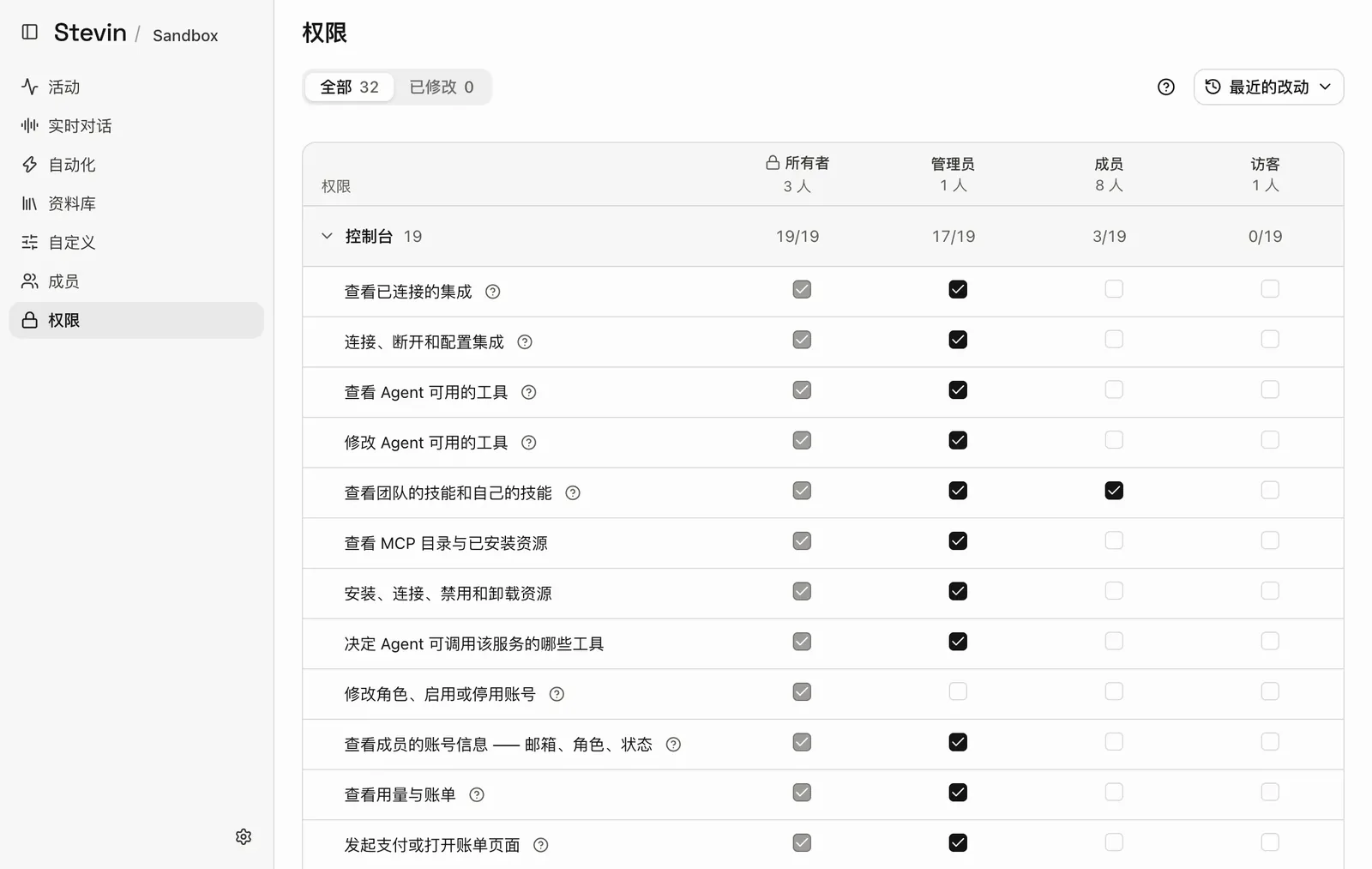
- All and ChangedShow every permission, or only the ones that differ from the default.
- Recent changesWho changed which permission, when, and what it was before.
- Role columnsOne column per role, with the number of people in it. The Owner column is locked.
- GroupPermissions are grouped. The counts on the right show how many of the group each role has.
- PermissionWhat the row controls, in plain words. The question mark explains it further.
- A cellThe value for one role. Select it to change it; it is saved at once.
Three kinds of value#
| Group | Values | The question it answers |
|---|---|---|
| Console | Allow or Deny | May this role do this at all? |
| Data and the agent | no one, their own, everyone | Over whose tasks, records, transcripts or skills? |
| What Stevin may decide in a conversation | ask every time, ask for anything new, never ask | How often does Stevin ask before doing this from a conversation? |
A role higher on the ladder does not automatically get more: each cell is set on its own. An unknown or missing value always means no access.
Console permissions#
These decide who can see and change parts of the console: integrations, MCP servers and their tool review, team usage and billing, default models, directory sync, WhatsApp pairing, roles and accounts, and this page. They also include the most basic one, Talk to the agent at all, which Viewers do not have by default.
Data permissions#
Data permissions are scoped. For example, See tasks set to their own for a role means people with that role see only tasks they started; set to everyone, they see the whole team's.
The same scopes apply when Stevin acts on someone's behalf: it reaches only what the person asking is allowed to reach. A Member who may read only their own transcripts cannot get Stevin to read a colleague's.
What Stevin may decide in a conversation#
Two settings control whether Stevin asks before it sets something up from a conversation:
- Let a conversation install and connect an MCP
- Let a conversation switch on a tool of an installed MCP
| Value | Behaviour |
|---|---|
| ask every time | A confirmation each time. The default for every role |
| ask for anything new | Asks only for something that has not been approved before |
| never ask | Does it without a confirmation |
These settings only remove a confirmation. Who may install or review at all is still decided by the console permissions above. A rejected request is not remembered: the next request asks again.
Recent changes#
The bottom of the page lists Recent changes: who changed which permission, when, and what the value was before. Use it to review or undo a change.
Change a permission#
- Open Permissions.
- Find the row and the role's column.
- Choose the new value. It is saved at once.
Advice#
- Change one thing at a time and check that the result is what you meant.
- Widen data scopes with care: everyone on a read permission lets that role, and Stevin on its behalf, see the whole team's data of that kind.
- Keep delete permissions narrow. Deletes always need approval as well; see Approvals.
For every permission and its default per role, see the Permission reference.